
Is Claude AI Free to Use?

Yes — Claude AI is free to use. Anthropic offers a permanent Free plan that costs $0, needs no payment details, and gives you real access to Claude on the web, desktop and mobile apps. It is not a 7-day trial and it does not expire. What it does have is a usage allowance that refills every few hours — and a short list of features that are reserved for paying customers.
This guide breaks down exactly what the free plan includes, what it leaves out, how the limits actually work (in Anthropic’s own terms), and how to tell whether free is enough for you or whether Pro is worth paying for.
Contents
– What you get on Claude’s free plan
– Which models can free users actually use?
– What the free plan leaves out
– How Claude’s free limits actually work
– How many messages do you really get?
– How to sign up for Claude free
– How to make the free plan last longer
– Claude Free vs Pro vs Max at a glance
– Who should stay free — and who should upgrade
– Common mistakes and troubleshooting
– Frequently asked questions
– The bottom line
What you get on Claude’s free plan
Anthropic describes the Free plan as “free for everyone,” and the feature list is more generous than many people expect. According to Anthropic’s pricing page (checked 17 October 2026), the free plan includes:
- Chat on web, desktop and mobile — the full Claude conversation experience at claude.ai and in the iOS, Android and desktop apps.
- Web search — Claude can search the web and cite current information, not just answer from training.
- File creation and code execution — Claude can build spreadsheets, documents and presentations, and run code to analyse data you upload.
- Memory across conversations — Claude can remember context and preferences between chats.
- Connectors — you can connect external apps and tools to Claude.
- Artifacts — you can create Artifacts: standalone documents, code and mini-apps generated inside a chat, which you can share.
- Claude Design, Slides and Docs — Anthropic’s newer creation surfaces are listed in the free plan’s feature set.
- Projects (up to 5) — you can organise chats into a small number of Projects with their own context.
- Voice mode — voice conversations are part of the plan feature set in the apps.
- A large context window — up to 1M tokens depending on the model, so long documents and long conversations are within reach even for free users.
Two things are worth underlining. First, none of this requires a credit card: there is no checkout for a $0 plan, just an account. Second, this is the current free plan. Anthropic has steadily moved features down from paid tiers — memory, web search, file creation and Artifacts were not always free — so the list above is a snapshot dated October 2026, and it is worth re-checking Anthropic’s pricing page for the latest version.
Which models can free users actually use?
Claude comes in model families — Haiku (fastest), Sonnet (the everyday all-rounder), Opus (the flagship for hard work) and Fable (the top-end tier). On the free plan, Anthropic’s plan comparison gives you:
- Sonnet — the main model you’ll chat with. As of October 2026 this is the Sonnet 5.5 generation: strong at writing, coding, analysis and long-document work.
- Haiku — the fast, lightweight model, used for quick tasks.
What free users do not get:
- Opus — Anthropic lists “more Claude models” as a Pro benefit; Opus is not part of the free plan.
- Fable — Anthropic’s comparison table is explicit: Fable is not available on Free at all. On Pro it runs on pay-as-you-go usage credits, and only on Max is it included (up to 50% of your weekly limits).
For most everyday work — drafting, summarising, brainstorming, homework help, everyday coding questions — Sonnet is the model people would choose anyway. The model restriction on free is real but, for casual and moderate use, it is rarely the thing that pushes people to upgrade. The usage limits below matter much more.
What the free plan leaves out
Beyond Opus and Fable, the free plan’s main exclusions are:
- Claude Code — Anthropic’s terminal coding agent is included in all paid plans and not in Free. If you want an agent that works inside your codebase, that starts at Pro.
- Higher usage — the big one; see the next section.
- Unlimited Projects and project collaboration — free Projects are capped at 5, and sharing/collaboration features sit on paid plans.
- Claude in Chrome and Microsoft 365 integrations — listed as Pro features.
- Claude Dashboards (beta) and Claude Science — Pro-and-up features at the time of writing.
- Priority access at busy times — that’s a Max feature; free users are first in line to be slowed down when demand spikes.
- Usage credits — when paid users hit a limit they can optionally keep going at standard API rates. Free users cannot buy their way past a limit; they wait for the reset.
None of these make the free plan a demo. They are the fence lines of a freemium product: the full assistant is free; the capacity and the professional tooling are what you pay for.

How Claude’s free limits actually work
This is where most articles get Claude wrong, so here is the mechanism in Anthropic’s own terms, from the pricing page’s usage FAQ (checked 17 October 2026):
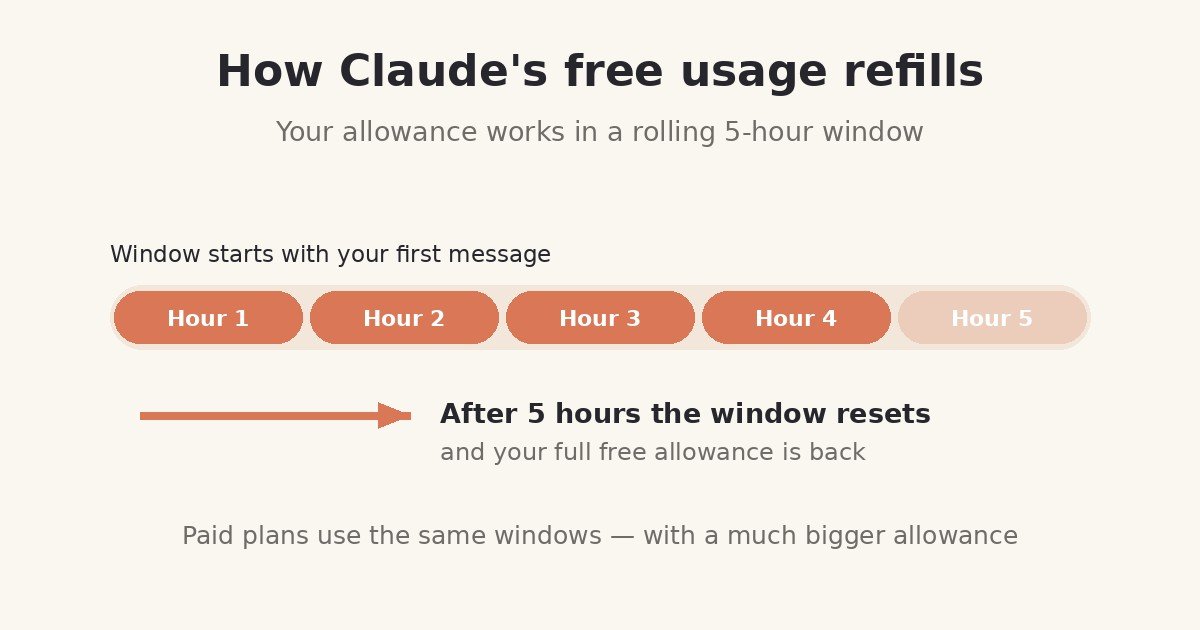
- Every plan has usage limits that reset on a rolling five-hour session window. Your session starts with your first message; five hours later, the allowance refills.
- Paid plans add weekly limits on top. The free plan’s control is the session window (Anthropic notes it may apply other caps at its discretion to keep access fair).
- There is no fixed message count. Anthropic states this plainly: how much you can do “depends on the length and complexity of your conversations, the model you choose, and the features you use, so there’s no fixed message count.”
- Everything draws from one pool. Your activity on web, desktop, mobile — and Claude Code, if you had it — all counts against the same allowance.
- You can check your standing any time in Settings → Usage inside Claude.
- Paid plans get at least 5× the free allowance. Anthropic’s benchmark: “Pro gives you at least 5x more usage per 5-hour session than Free,” and Max gives 5× or 20× Pro’s per-session usage.
How many messages do you really get?
Because Anthropic meters work, not messages, any site that quotes you an exact free message count is guessing. A one-line question costs almost nothing; a request to analyse a 200-page PDF costs a lot, because the whole document (and, in a long chat, the whole history) is processed with every turn.
Independent guides that track the free tier typically report somewhere in the range of roughly 10–40 short messages per five-hour window, with long conversations, large attachments and heavy features pulling you toward the low end — treat that as a third-party estimate that moves with demand, not an Anthropic figure. The only number that is definitely yours is the reset time Claude shows you when you hit the limit, and your live standing in Settings → Usage.
What uses up your allowance fastest
- Long conversations. Every new message re-processes the conversation so far. Message 30 in a thread costs far more than message 1.
- Big attachments. PDFs, spreadsheets and images add a lot of content for the model to process on every turn.
- Heavy features. Web searches, file creation and code execution do extra work per request.
- Peak times. Anthropic may tighten effective limits when demand is high, and free users feel it first.
How to sign up for Claude free
- Go to claude.ai (or install the Claude app on iOS/Android, or the desktop app).
- Create an account with your email address or a Google/Apple sign-in.
- Verify your account if prompted, and you’re in — you’re on the Free plan by default.
- Start chatting. No card, no trial countdown, no automatic conversion to a paid plan: upgrading is always a deliberate choice in Settings → Billing.
If you later decide to upgrade, Pro is $20/month billed monthly, or $17/month billed annually ($200 up front) — prices from Anthropic’s pricing page, before tax, checked 17 October 2026.
How to make the free plan last longer
You can’t raise the free allowance, but you can stop wasting it:
- Start a new chat when you change subject. Carrying a long, unrelated history into a new question makes every message re-process that history.
- Ask complete questions. One well-formed prompt (“summarise this, then list the risks, then draft a reply”) is cheaper than six follow-ups that each re-read the same material.
- Be selective with attachments. Upload the relevant pages or the smaller file, not the entire archive.
- Draft offline, polish in Claude. Write your rough text yourself, then use Claude for the high-value pass — editing, tightening, restructuring — instead of generating everything from scratch.
- Time heavy work. If you hit the limit mid-task, note the reset time Claude shows you and batch your next requests for after it.
- Check Settings → Usage before a big session so you know how much room you have.
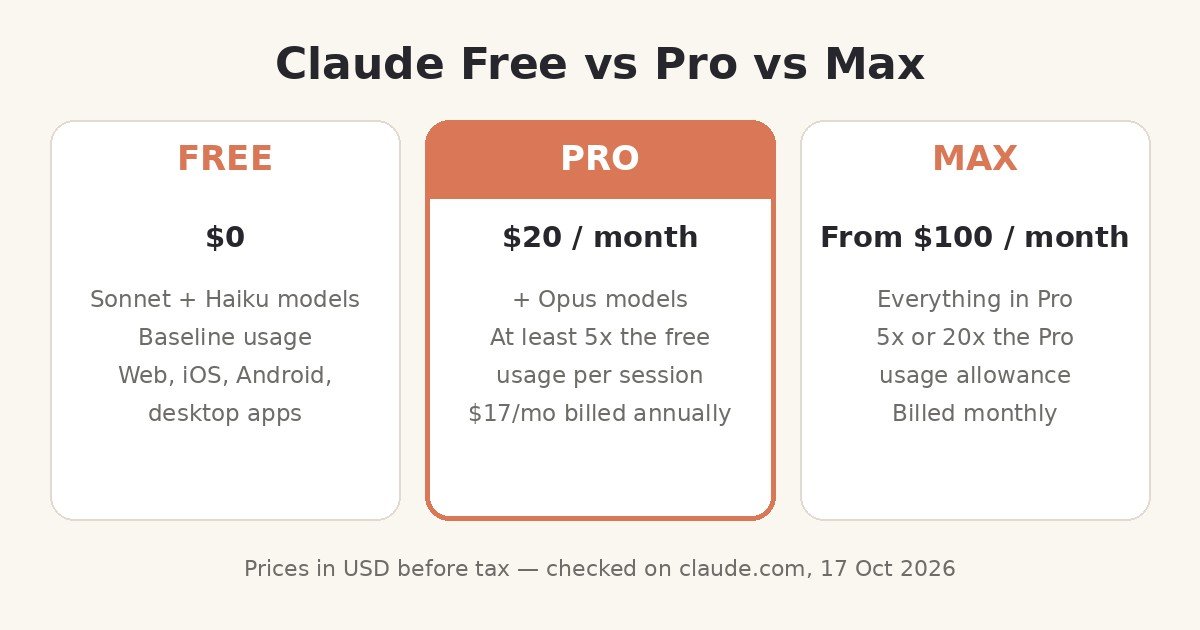
Claude Free vs Pro vs Max at a glance
| Free | Pro | Max | |
|---|---|---|---|
| Price (USD, before tax) | $0 | $20/mo, or $17/mo billed annually ($200 up front) | From $100/mo (5×) or $200/mo (20×), billed monthly |
| Models | Sonnet, Haiku | + Opus; Fable via usage credits | + Opus; Fable included (up to 50% of weekly limits) |
| Usage per 5-hour session | Baseline | At least 5× Free | 5× or 20× Pro |
| Weekly limits | Session window is the main control | Yes, on top of session limits | Yes, on top of session limits |
| Claude Code | ✗ | ✓ | ✓ |
| Projects | Up to 5 | Unlimited | Unlimited |
| Claude in Chrome / Microsoft 365 | ✗ | ✓ | ✓ |
| Priority at peak times | ✗ | ✓ | ✓ |
| Monthly API credits included | ✗ | ✗ | $100–$200/month |
Source: Anthropic’s official pricing page, claude.com/pricing, checked 17 October 2026. Team plans (per-seat) and Enterprise ($20/seat plus API-rate usage) exist for organisations and are covered in our Claude pricing explainer [suggested future link].
Who should stay free — and who should upgrade
The free plan is genuinely enough if you:
– Use Claude a few times a day for questions, drafting, summaries and ideas.
– Are a student or casual user whose heavy sessions are occasional.
– Want to evaluate Claude properly before paying anything — the free plan is the full assistant, not a crippled demo.
Consider Pro ($20, or $17 annual) if you:
– Hit the free limit more than a couple of times a week.
– Want Claude Code, Opus, unlimited Projects, or the Chrome/Microsoft 365 integrations.
– Use Claude as a daily work tool and lose momentum waiting for resets.
Consider Max ($100/$200) only if you:
– Already max out Pro regularly — Max buys 5× or 20× Pro’s headroom, higher output limits, priority at peak times and included monthly API credits. It is a capacity plan, not a features plan.
The honest pros and cons of staying free:
– ✅ Pros: $0 forever, no card, current-generation Sonnet model, web search, files, memory, connectors and Artifacts included.
– ❌ Cons: the session allowance runs out fast under heavy use; no Opus, Fable or Claude Code; no way to pay past a limit — you wait; first to be squeezed at peak times.
Common mistakes and troubleshooting
- “Claude says I’ve reached my limit — is my account broken?” No. You’ve used your session allowance. Claude shows the reset time in the message; your allowance refills when the five-hour window rolls over. Check Settings → Usage for your standing.
- “I only sent a few messages and hit the limit.” Almost always a long conversation or a large attachment: both make every message expensive. Start a fresh chat and re-attach only what’s needed.
- “Does the free plan expire or convert to paid automatically?” No. Free is a standing plan, not a trial. You are only ever charged if you deliberately subscribe in Settings → Billing.
- “Can I get more free usage with a second account?” Anthropic’s terms govern account use, and limits are managed per its policies; the supported routes are waiting for the reset or upgrading. This site doesn’t recommend circumventing a provider’s limits.
- “Is my data used for training?” Anthropic’s pricing page lists model-training opt-out controls on all plans, including Free. Review the current settings and Anthropic’s privacy documentation in your account, since policies are the kind of detail that changes.
- “Why did my limit feel smaller today?” Effective limits vary with overall demand — Anthropic says so itself. Peak hours are the usual culprit.
Frequently asked questions
Is Claude AI really free, or is it a trial?
Really free. The Free plan is a permanent $0 tier on Anthropic’s pricing page — not a timed trial — and it does not convert to a paid plan on its own.
Do I need a credit card to use Claude free?
No. There is nothing to pay, so there is no checkout; you just create an account.
Which model does the free plan use?
Sonnet (the current 5.5 generation as of October 2026) and Haiku. Opus is a paid-plan model, and Fable is not available on Free at all.
How many messages do I get on Claude free?
Anthropic does not publish a fixed number — the allowance is metered by the work your messages require and resets every five hours. Third-party trackers typically observe roughly 10–40 short messages per window; long chats and big files reduce that substantially.
What happens when I hit the free limit?
Claude tells you when your allowance resets. You can wait for the reset or upgrade; unlike paid users, free users can’t continue on usage credits.
Is Claude free for commercial use?
The Free plan is a consumer plan governed by Anthropic’s Consumer Terms; businesses should review the current terms for their use case, and teams typically belong on Team or API plans. Check the current terms before relying on free Claude in a commercial workflow — this article is not legal advice.
Claude free vs ChatGPT free — which is better?
Both are real free tiers with session-style limits. Claude free’s distinctive strengths are its long-context document work, file creation and Artifacts; the detailed task-by-task verdict is in our Claude vs ChatGPT comparison [suggested future link].
The bottom line
Yes, Claude AI is free to use — properly free, with the current Sonnet model, web search, file creation, memory, connectors and Artifacts, and no credit card. The catch is capacity, not capability: a five-hour session allowance that heavy users will feel within days, and a paid fence around Opus, Fable, Claude Code and unlimited Projects.
Your next step: create the free account and use it for a week of your real work. If you rarely see the limit message, you never needed to pay. If it interrupts you twice in that week, Pro at $17/month billed annually is the upgrade Anthropic designed for exactly that moment — and our free-vs-Pro-vs-Max decision guide [suggested future link] will help you pick.
Prices, features and limits in this article were checked against Anthropic’s official pricing page on 17 October 2026 and can change; Anthropic’s page is the source of truth.